
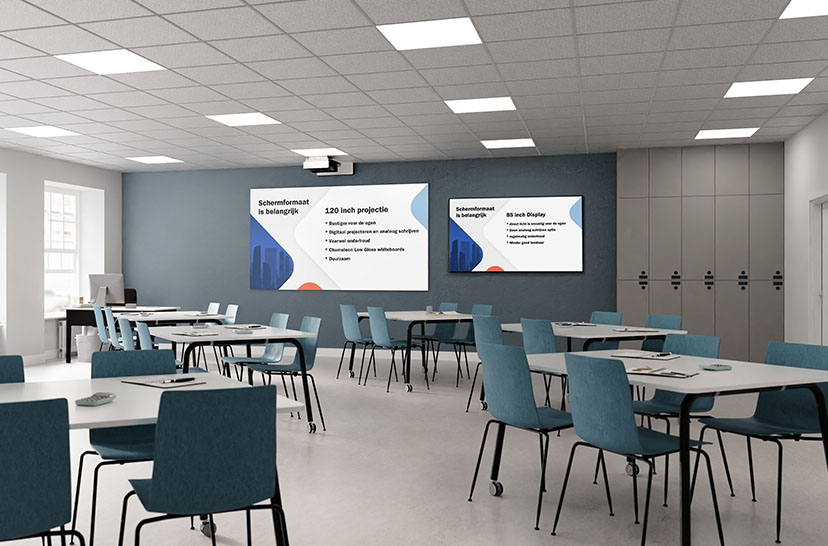
When buying digital boards for the classroom, or even for an entire school, it’s important to weigh up all the alternatives. In this article you’ll learn the key differences and similarities between projectors with a whiteboard and digital boards. This information will help you make an informed decision. Read on and form your own opinion.

Array
(
    [1049] => WP_Post Object
        (
            [ID] => 1049
            [post_author] => 1
            [post_date] => 2026-10-20 06:45:09
            [post_date_gmt] => 2019-08-05 13:54:24
            [post_content] =>
            [post_title] => Products
            [post_excerpt] =>
            [post_status] => publish
            [comment_status] => closed
            [ping_status] => closed
            [post_password] =>
            [post_name] => whiteboards-5
            [to_ping] =>
            [pinged] =>
            [post_modified] => 2026-10-20 06:45:09
            [post_modified_gmt] => 2026-10-20 06:45:09
            [post_content_filtered] =>
            [post_parent] => 0
            [guid] => https://chameleonwriting.falkor.alcor.cloud/?p=1049
            [menu_order] => 1
            [post_type] => nav_menu_item
            [post_mime_type] =>
            [comment_count] => 0
            [filter] => raw
            [db_id] => 1049
            [menu_item_parent] => 0
            [object_id] => 1049
            [object] => custom
            [type] => custom
            [type_label] => Custom Link
            [title] => Products
            [url] => #
            [target] =>
            [attr_title] =>
            [description] =>
            [classes] => Array
                (
                    [0] =>
                )

            [xfn] =>
        )

    [12842] => WP_Post Object
        (
            [ID] => 12842
            [post_author] => 82
            [post_date] => 2026-10-20 06:45:10
            [post_date_gmt] => 2023-08-31 08:07:16
            [post_content] =>
            [post_title] =>
            [post_excerpt] =>
            [post_status] => publish
            [comment_status] => closed
            [ping_status] => closed
            [post_password] =>
            [post_name] => 12842
            [to_ping] =>
            [pinged] =>
            [post_modified] => 2026-10-20 06:45:10
            [post_modified_gmt] => 2026-10-20 06:45:10
            [post_content_filtered] =>
            [post_parent] => 0
            [guid] => https://chameleonwriting.falkor.alcor.cloud/?p=12842
            [menu_order] => 68
            [post_type] => nav_menu_item
            [post_mime_type] =>
            [comment_count] => 0
            [filter] => raw
            [db_id] => 12842
            [menu_item_parent] => 0
            [object_id] => 12839
            [object] => page
            [type] => post_type
            [type_label] => Page
            [url] => https://chameleonwriting.com/en/references-3/
            [title] => References
            [target] =>
            [attr_title] =>
            [description] =>
            [classes] => Array
                (
                    [0] =>
                )

            [xfn] =>
        )

    [11862] => WP_Post Object
        (
            [ID] => 11862
            [post_author] => 82
            [post_date] => 2026-10-20 06:45:10
            [post_date_gmt] => 2023-08-21 13:36:51
            [post_content] =>
            [post_title] => pCon
            [post_excerpt] =>
            [post_status] => publish
            [comment_status] => closed
            [ping_status] => closed
            [post_password] =>
            [post_name] => pcon-data
            [to_ping] =>
            [pinged] =>
            [post_modified] => 2026-10-20 06:45:10
            [post_modified_gmt] => 2026-10-20 06:45:10
            [post_content_filtered] =>
            [post_parent] => 642
            [guid] => https://chameleonwriting.falkor.alcor.cloud/?p=11862
            [menu_order] => 69
            [post_type] => nav_menu_item
            [post_mime_type] =>
            [comment_count] => 0
            [filter] => raw
            [db_id] => 11862
            [menu_item_parent] => 0
            [object_id] => 4701
            [object] => page
            [type] => post_type
            [type_label] => Page
            [url] => https://chameleonwriting.com/en/information/chameleon-now-available-in-pcon/
            [title] => pCon
            [target] =>
            [attr_title] =>
            [description] =>
            [classes] => Array
                (
                    [0] =>
                )

            [xfn] =>
        )

    [32752] => WP_Post Object
        (
            [ID] => 32752
            [post_author] => 85
            [post_date] => 2026-10-20 06:45:10
            [post_date_gmt] => 2025-08-07 10:59:20
            [post_content] =>
            [post_title] => Order Samples
            [post_excerpt] =>
            [post_status] => publish
            [comment_status] => closed
            [ping_status] => closed
            [post_password] =>
            [post_name] => order-samples-2
            [to_ping] =>
            [pinged] =>
            [post_modified] => 2026-10-20 06:45:10
            [post_modified_gmt] => 2026-10-20 06:45:10
            [post_content_filtered] =>
            [post_parent] => 0
            [guid] => https://chameleonwriting.com/?p=32752
            [menu_order] => 70
            [post_type] => nav_menu_item
            [post_mime_type] =>
            [comment_count] => 0
            [filter] => raw
            [db_id] => 32752
            [menu_item_parent] => 0
            [object_id] => 32718
            [object] => page
            [type] => post_type
            [type_label] => Page
            [url] => https://chameleonwriting.com/en/chameleon-samples/
            [title] => Order Samples
            [target] =>
            [attr_title] =>
            [description] =>
            [classes] => Array
                (
                    [0] =>
                )

            [xfn] =>
        )

    [26482] => WP_Post Object
        (
            [ID] => 26482
            [post_author] => 85
            [post_date] => 2026-10-20 06:45:10
            [post_date_gmt] => 2025-01-17 11:08:57
            [post_content] =>
            [post_title] => Information
            [post_excerpt] =>
            [post_status] => publish
            [comment_status] => closed
            [ping_status] => closed
            [post_password] =>
            [post_name] => information-2
            [to_ping] =>
            [pinged] =>
            [post_modified] => 2026-10-20 06:45:10
            [post_modified_gmt] => 2026-10-20 06:45:10
            [post_content_filtered] =>
            [post_parent] => 0
            [guid] => https://chameleonwriting.com/?p=26482
            [menu_order] => 71
            [post_type] => nav_menu_item
            [post_mime_type] =>
            [comment_count] => 0
            [filter] => raw
            [db_id] => 26482
            [menu_item_parent] => 0
            [object_id] => 26482
            [object] => custom
            [type] => custom
            [type_label] => Custom Link
            [title] => Information
            [url] => #
            [target] =>
            [attr_title] =>
            [description] =>
            [classes] => Array
                (
                    [0] =>
                )

            [xfn] =>
        )

    [36031] => WP_Post Object
        (
            [ID] => 36031
            [post_author] => 85
            [post_date] => 2026-10-20 06:45:10
            [post_date_gmt] => 2025-11-12 11:54:33
            [post_content] =>
            [post_title] => ProTips
            [post_excerpt] =>
            [post_status] => publish
            [comment_status] => closed
            [ping_status] => closed
            [post_password] =>
            [post_name] => protips-2
            [to_ping] =>
            [pinged] =>
            [post_modified] => 2026-10-20 06:45:10
            [post_modified_gmt] => 2026-10-20 06:45:10
            [post_content_filtered] =>
            [post_parent] => 0
            [guid] => https://chameleonwriting.com/?p=36031
            [menu_order] => 78
            [post_type] => nav_menu_item
            [post_mime_type] =>
            [comment_count] => 0
            [filter] => raw
            [db_id] => 36031
            [menu_item_parent] => 0
            [object_id] => -325
            [object] => kennisbank
            [type] => post_type_archive
            [title] => ProTips
            [type_label] => Post Type Archive
            [url] => https://chameleonwriting.com/en/protips/
            [target] =>
            [attr_title] =>
            [description] =>
            [classes] => Array
                (
                    [0] =>
                )

            [xfn] =>
        )

    [19332] => WP_Post Object
        (
            [ID] => 19332
            [post_author] => 3
            [post_date] => 2026-10-20 06:45:10
            [post_date_gmt] => 2024-05-14 11:58:44
            [post_content] =>
            [post_title] => Contact
            [post_excerpt] =>
            [post_status] => publish
            [comment_status] => closed
            [ping_status] => closed
            [post_password] =>
            [post_name] => contact-4
            [to_ping] =>
            [pinged] =>
            [post_modified] => 2026-10-20 06:45:10
            [post_modified_gmt] => 2026-10-20 06:45:10
            [post_content_filtered] =>
            [post_parent] => 0
            [guid] => https://chameleonwriting.com/?p=19332
            [menu_order] => 79
            [post_type] => nav_menu_item
            [post_mime_type] =>
            [comment_count] => 0
            [filter] => raw
            [db_id] => 19332
            [menu_item_parent] => 0
            [object_id] => 19332
            [object] => custom
            [type] => custom
            [type_label] => Custom Link
            [title] => Contact
            [url] => https://chameleonwriting.com/en/contact/
            [target] =>
            [attr_title] =>
            [description] =>
            [classes] => Array
                (
                    [0] =>
                )

            [xfn] =>
        )

    [12326] => WP_Post Object
        (
            [ID] => 12326
            [post_author] => 82
            [post_date] => 2026-10-20 06:45:10
            [post_date_gmt] => 2023-08-25 07:08:58
            [post_content] =>
            [post_title] => Languages
            [post_excerpt] =>
            [post_status] => publish
            [comment_status] => closed
            [ping_status] => closed
            [post_password] =>
            [post_name] => taalschakelaar-6
            [to_ping] =>
            [pinged] =>
            [post_modified] => 2026-10-20 06:45:10
            [post_modified_gmt] => 2026-10-20 06:45:10
            [post_content_filtered] =>
            [post_parent] => 0
            [guid] => https://chameleonwriting.falkor.alcor.cloud/?p=12326
            [menu_order] => 80
            [post_type] => nav_menu_item
            [post_mime_type] =>
            [comment_count] => 0
            [filter] => raw
            [db_id] => 12326
            [menu_item_parent] => 0
            [object_id] => 12326
            [object] => custom
            [type] => custom
            [type_label] => Language switcher
            [title] => EN
            [url] => #pll_switcher
            [target] =>
            [attr_title] =>
            [description] =>
            [classes] => Array
                (
                    [0] => pll-parent-menu-item
                )

            [xfn] =>
        )

)
1
News
Purchasing a digital whiteboard for the classroom?
The power of interactivity: a digital board versus a projector
Digital boards are often praised for their interactivity, letting presenters and teachers write, draw and even add multimedia with a simple touch of the screen. That’s undoubtedly an advantage, but modern projectors with whiteboard functionality can offer similar interactive possibilities. These projectors turn an ordinary whiteboard into an interactive surface, letting users write and draw with special pens or even just their fingers. That lets you combine the benefits of interactivity with the analogue experience of using a whiteboard in the classroom. Many teachers also say they prefer an analogue whiteboard over a digital board for writing on the board. Even as digital boards keep getting faster, they still don’t match the experience of working on an analogue whiteboard.
Purchase price relative to size (viewing distance)
One of the most obvious benefits of using a projector on a whiteboard is cost efficiency. For the same price, you can get a larger image area. For example: for the same price as an average 80-inch board, you could instead choose a 120-inch interactive projection surface. The viewing distance of an 80-inch screen is 4 to 5 metres. That quickly makes it difficult for students at the back of the classroom to read along. A 120-inch surface has a viewing distance of at least 7 metres, meaning that in most classrooms, all students can read along without any trouble.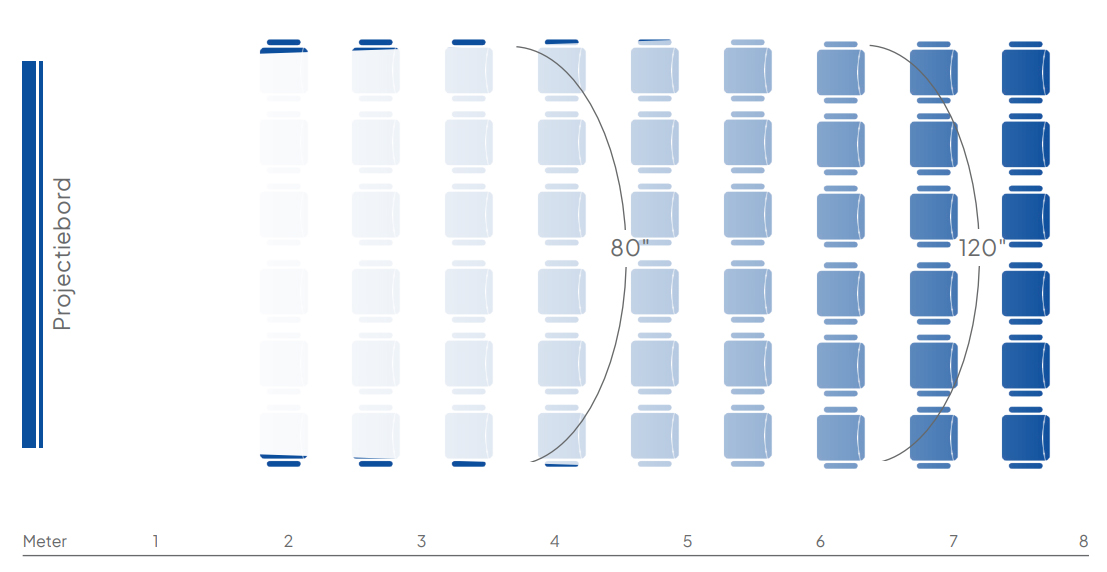
Depreciation and energy consumption
The depreciation period for a digital board at a school averages 5 to 6 years. A projector has a depreciation period of 8 to 10 years. The Chameleon whiteboard also comes with a lifetime guarantee on perfect writing, erasing and projection. Given the current fluctuations in energy prices, energy consumption is also worth considering. A projector can be up to twice as energy-efficient as a digital board. That said, digital boards are steadily improving on energy consumption.
Image quality vs. eye strain
Digital boards are known for delivering a bright, sharp image. The display produces direct light that shines straight into the eyes. The upside of that is image quality, but what’s less well known is that the direct light causes tired eyes. With frequent exposure over the course of a day, this can even cause headaches for teachers and students. Why do we protect our children at home from too much screen time, if they’re doing the same thing at school?What about a projector with a projection surface? A projector reflects light off the whiteboard back into the eyes. This indirect light isn’t tiring, doesn’t cause headaches, and can therefore be used all day long. The projectors from our partner Epson have also been significantly improved over the past decades. They have such a high White Light Output that images remain sharp and vivid even in daylight-filled rooms.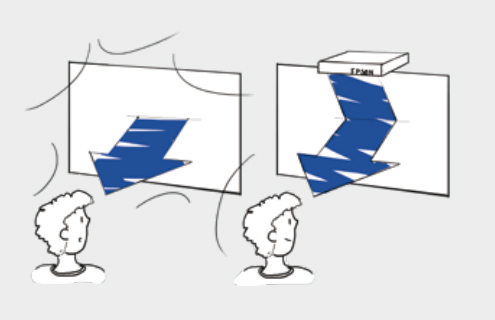 “Personally, I really enjoy writing by hand with a pen, because it keeps me at the same pace as the students who are taking notes. If I were typing something on a digital board, the children would barely be able to keep up with that pace. The projection surface is designed so that even the children at the very back of the room can read the content with ease.”Herman van der Roerst – Mathematics teacher at Montessori College in Aerdenhout
Ease of use
A common problem with digital boards is technical complexity. From complicated software operation to hardware issues: digital boards can sometimes be frustrating to use, especially for users with limited technical skills. The result is probably familiar: teachers end up using less than a quarter of what a digital board can actually do. With an interactive projector on a whiteboard, much of this complexity is removed. Projectors require only minimal installation and are generally easy to use, letting users focus on their presentation or lesson without being distracted by technical issues.
No limits on functionality
Although digital boards offer advanced features such as touchscreen capabilities and integration with specific software, they’re often limited to the functionality provided by the manufacturer. With a projector on a whiteboard, on the other hand, the possibilities are endless. Users can use any software or app they want, from Microsoft Office to learning tools like Khan Academy. That gives teachers and presenters the freedom to use whichever tools best suit their needs, without being limited by the constraints of a specific digital board.
Conclusion
Digital boards undoubtedly have their place in modern education and business environments, yet using a projector on a whiteboard brings clear advantages. Let’s recap them once more:
- A projector + whiteboard has a lower purchase price than a digital board.
- That means you can get a larger image area for the same price.
- The depreciation period of a projector with whiteboard is longer than that of a digital board.
- The energy consumption of a digital board is higher than that of a projector.
- A digital board is tiring on the eyes, a projection is not.
- Both can be used interactively, but a projector is easier to operate.
- A projector can work together with various educational software.
Of course, it should be said that the digital board certainly has its own strengths too. Its image quality is excellent. It’s also easy for young children to play learning games on a digital board, something that’s less common on a projection surface.By making use of these benefits, users can create a richer learning and presentation experience.
Want to learn more about projection on a whiteboard?
Discover the possibilities of projection on a whiteboard and find out how it compares to a digital board.